Last Sietch · Dune: Awakening

Find your sietch.

Three Hagga worlds, player trading and a community to call home. Choose your kind of desert. We'll help you get settled.

Checking the live population

Three worlds · one community

Choose your kind of desert.

These are separate persistent Hagga worlds. Your choice here is a guide; make the actual selection in the game.

PvE

Habbanya

Build, explore and tackle Arrakis without player-versus-player combat in your Hagga world.

How to join Habbanya

PvP with safe zones

Kulon

A contested Hagga world for players who want PvP with designated safe zones.

How to join Kulon

Full PvP · positions untracked

Amtal

Full PvP everywhere, including the tradeposts. The safe areas are the Riftwatch and Helius Gate settlements, each with a CHOAM Exchange terminal near the quartermaster. Listed in the browser as Amtal-Full-PvP.

Tradepost banners can flicker to Guild Peace. Tradeposts are still PvP.

See the safe areas How to join Amtal
CheckingReading populationChecking live statusLive pulse

From the browser to your first session

Get settled, step by step.

Amtal: PvP everywhere except two safe areas. The open desert and the tradeposts are PvP. Tradepost banners can flicker to Guild Peace; you can still be attacked there. Only the Riftwatch and Helius Gate settlements are safe.

1

Open the PC game

Open Dune: Awakening and its server browser. If you do not have the game, you can find it on Steam. You join the game through its browser, not through the portal.
2

Find Last Sietch

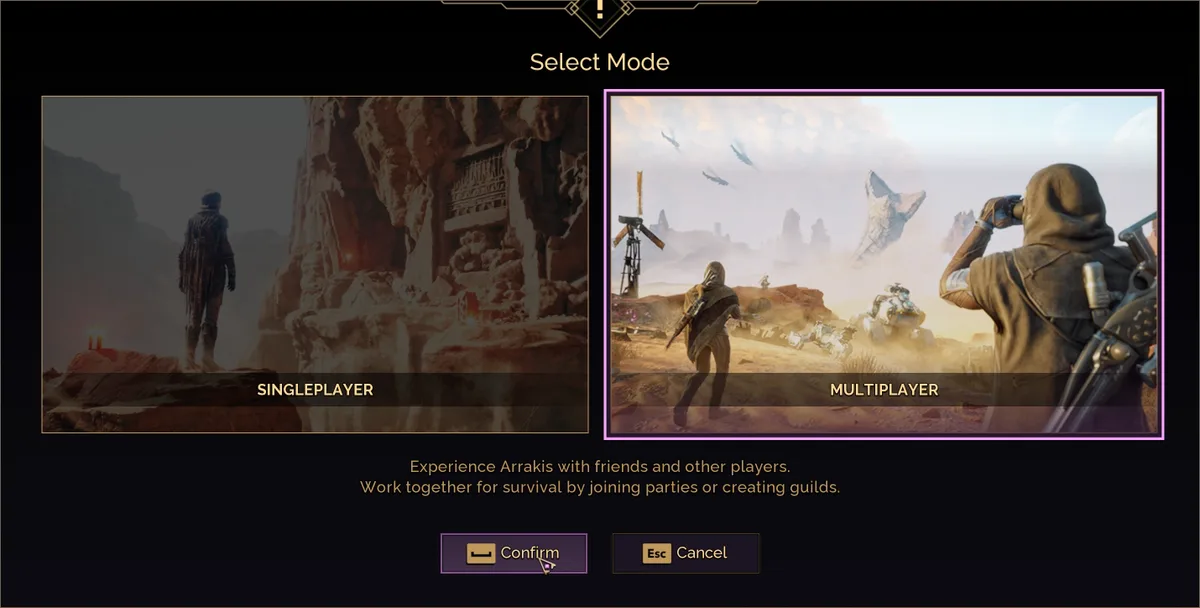
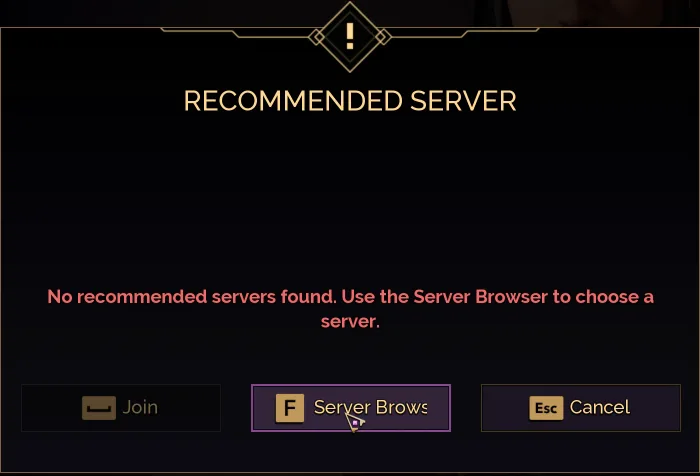
New character: select New Game, then Multiplayer and Confirm, then Server Browser in the Recommended Server popup.
Moving an existing character: open the Characters tab, then Server Browser.
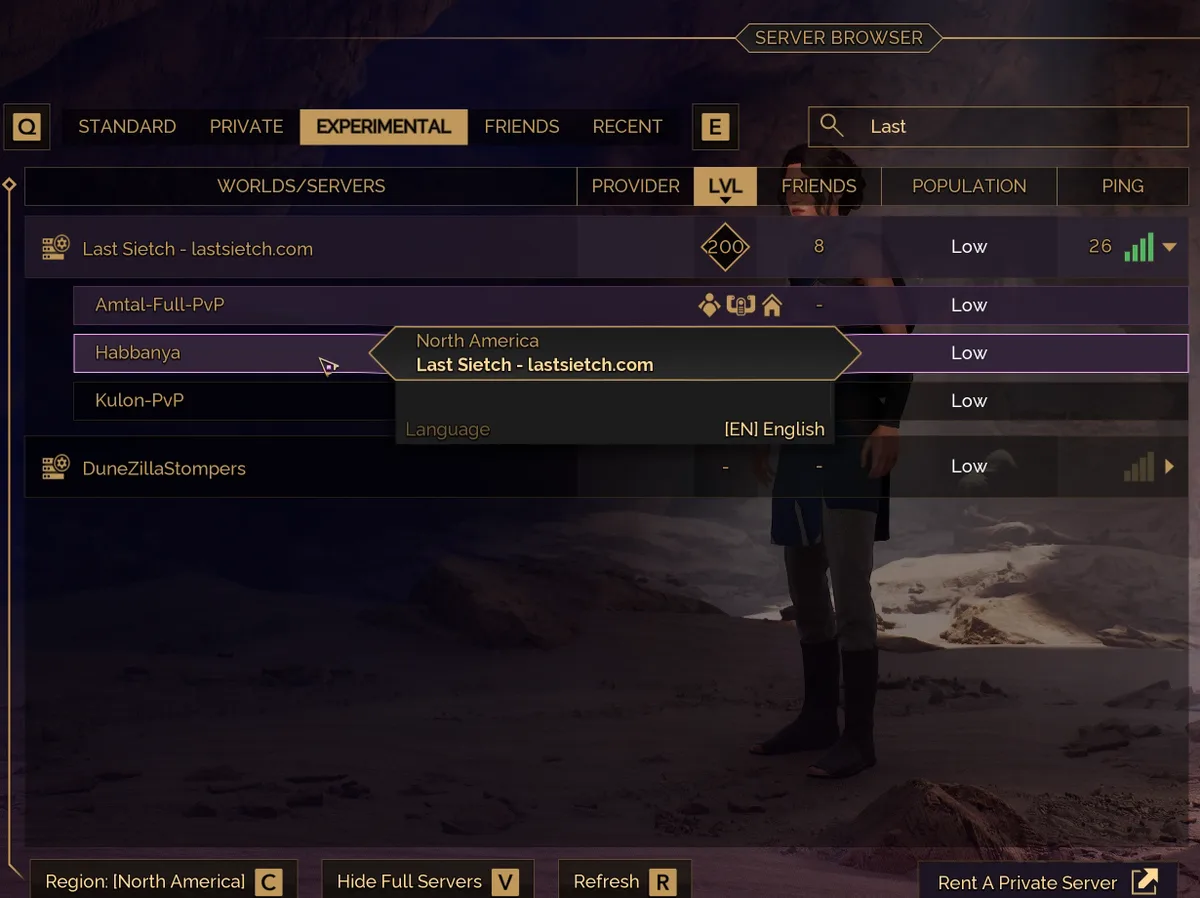
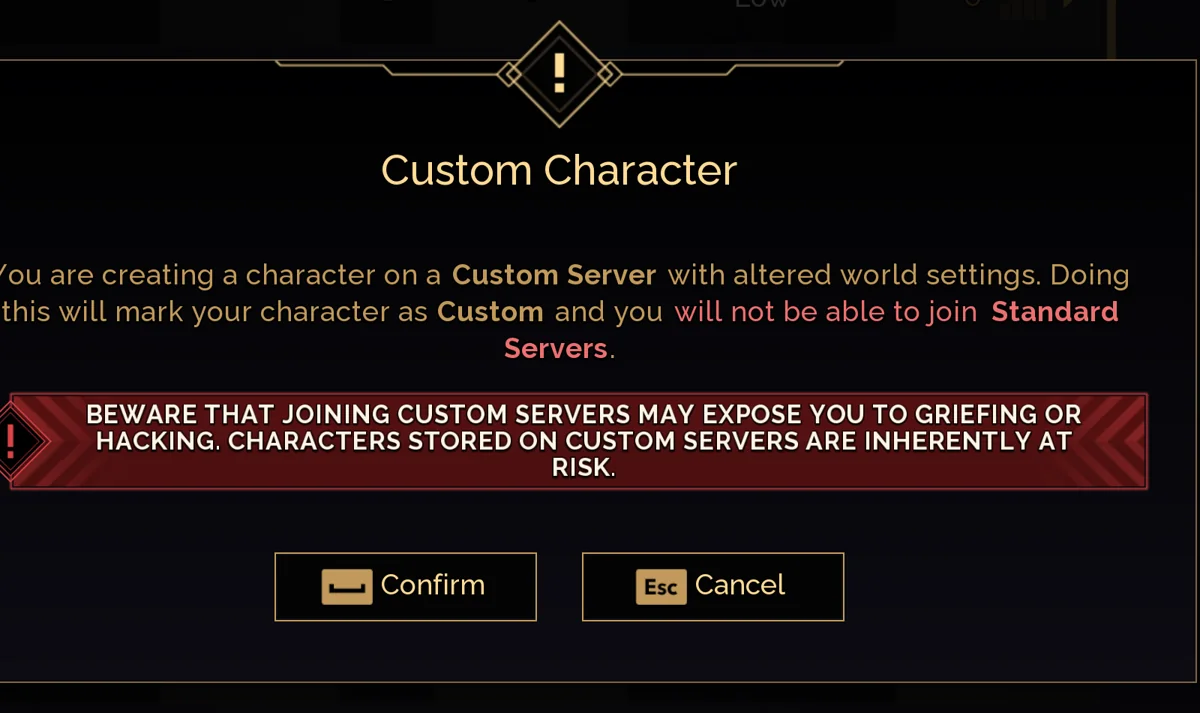
In the browser, choose the Experimental tab, keep region North America, and search for Last Sietch. Expand the row and choose Habbanya, Kulon or Amtal-Full-PvP, then select Join. An existing character shows Transfer instead. First-time joiners see a Custom Character warning. That is expected here. Read the warning, then confirm if you want to continue.
3

Find your welcome package

Starter equipment, supplies, an ornithopter kit and 100,000 Solari are sent during your first session. Anything that does not fit in your bag waits at a tradepost CHOAM Exchange terminal, in the Completed tab. On Amtal, collect it at the Riftwatch or Helius Gate terminal: those two are in safe areas. The game labels held items CANCELED; select Take item to collect them. Intel Points, Base Construction research and House Scrip are applied after logout. Check the portal's delivery details for each part's recorded status.
4

Connect your companion

Open the portal's first-session guide. Connect Discord, then verify your character using the answers shown in game. The portal helps you track deliveries, trade and find people to play with. Join the community Discord for help and conversation.

Finding the Sietch

Dune: Awakening Select Mode dialog with Multiplayer selected
New character: New Game, pick Multiplayer, then Confirm.
Recommended Server popup with the Server Browser button highlighted
In the Recommended Server popup, choose Server Browser.
Last Sietch in the Dune: Awakening server browser, Experimental tab, row expanded
In the Experimental tab, North America region, search Last Sietch. Expand the row for all three sietches: Habbanya, Kulon-PvP and Amtal-Full-PvP.
Custom Character warning dialog from Dune: Awakening
First-join warning. Custom servers mark your character as Custom, expected behavior. Hit Confirm.

Live from the battlegroup

The sietch right now.

--
Checking
    Peak · 24 hours
    --
    Play hours · 24 hours
    --
    Characters
    --
    At level 200
    --

    Activity

    Most players online in each hour, in your local time.

    Power curve

    Characters per 10 levels

    Recent level-ups

    • Loading

    Before you ask

    Common questions.

    Are character transfers open?

    Yes. Bring your character in from an official, private or experimental server. Open the Characters tab, then Server Browser, find Last Sietch and choose Transfer. The joining guide has every step.

    One thing to know first: under the game's current transfer rules, a character that comes here from an official or private server cannot move back.

    Which sietches have PvP?

    Each sietch is its own Hagga world with its own rules.

    • Habbanya: PvE. No player-versus-player combat in the Hagga world.
    • Kulon: closing October 28; its bases move to Amtal.
    • Amtal: full PvP everywhere, tradeposts included. Only the Riftwatch and Helius Gate settlements are safe, and a PvP defeat drops the loose loot in your backpack. See the safe areas.
    • Deep Desert: shared by all three sietches, with a PvE instance and a PvP instance. Check which one you are travelling to.
    What is in the welcome package?

    Every new character gets a starter kit during the first session: Mk3 armor, weapons, a shield and tools, a Scout Ornithopter kit and 100,000 Solari.

    Anything that does not fit in your bag waits at a tradepost CHOAM Exchange terminal in the Completed tab. The game labels it CANCELED; select Take item to collect it. Some parts, such as Intel Points and Base Construction research, are applied after you log out. See where it arrives.

    How do I skip the Base Reconstruction Tool wait?

    Our servers set the base backup cooldown to 10 seconds instead of 7 days. The game also reads this setting from your own PC, so add it once on your side:

    1. Fully close Dune: Awakening.
    2. Open %LOCALAPPDATA%\DuneSandbox\Saved\Config\WindowsClient\Engine.ini in Notepad.
    3. Add these two lines at the end, save, then start the game again.
    [ConsoleVariables]
    dw.OverrideBaseBackupToolTimeRestrictionInSeconds=10

    If the file already has a [ConsoleVariables] line, put the second line directly under it instead of adding another one.

    When are restarts and maintenance?

    We do not restart the servers outside announced maintenance. Maintenance lines up with Funcom's patch windows wherever we can, and each window is announced in our Discord first.

    The Deep Desert Coriolis reset runs every 14 days. The player portal shows the date and time of the next one.

    How do I report a bug or appeal a decision?

    Report bugs or players with /report in our Discord. Include your character name, the sietch and roughly when it happened.

    To appeal a ban or penalty, open a private staff ticket from the /report panel within 7 days. Once an appeal is reviewed, the decision is final.

    The code

    Rules of Engagement

    • Respect other Sietch members and their builds. Share what you know; we're stronger together.
    • Zero tolerance, instant permanent ban: doxxing, threats, stalking, slurs (even as a joke), cheats or hacks, real-money trading, and DDoS or any attack on the servers.
    • No griefing friendlies. Griefing means deliberately targeting players or groups who obviously cannot win the fight. Think of the school bully.
    • Report exploits with /report, never use them. Using one to get ahead is cheating.
    • Habbanya: an unclaimed build with no fief is fair game. Amtal: raiding is PvP, getting in through an exploit is not.
    • Amtal is full PvP everywhere, tradeposts included. Only the Riftwatch and Helius Gate settlements are safe.
    • Honour your trades. Staff do not insure them, so screenshot the big ones.
    • Read the full code, including trading, streaming and how to appeal.